Step 1 of 14
Create your account
Sign up in a few minutes and start a 14-day free trial.
Where to find it: shelfwise.co.ke → Start your free trial
How to do it
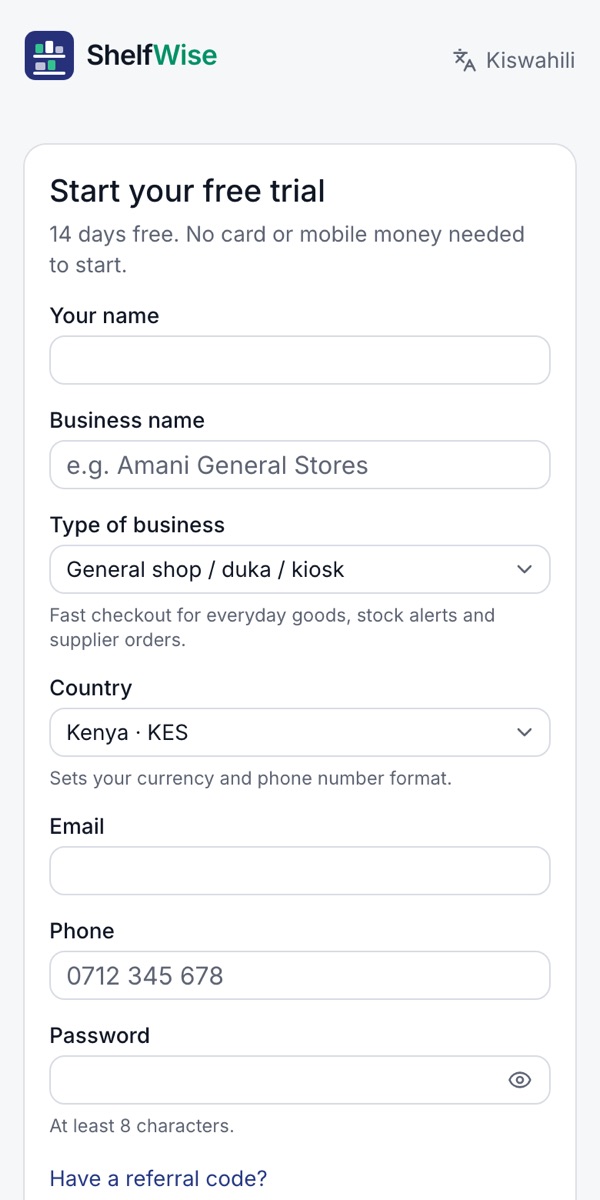
- 1Open shelfwise.co.ke on your phone or computer and tap Start your free trial.
- 2Enter your name and your business name.
- 3Choose your type of business. It sets up the till, the menu and the reports for the way you work, and you can change it later.
- 4Check the country, then enter your email, phone number and a password.
- 5Tap Create account. Your 14 days start now, with no card or mobile money needed.
Good to know: Have two businesses? Each one is its own account with its own stock and its own online shop.
Rather we set it up with you?
We visit your business, add your products, connect M-Pesa and switch on your online shop and riders. KSh 3,000, once.
Ask for assisted setup